
Make this website simpler#
Grandma Mode changes this website, not your VPN. The main navigation becomes Home, Android app and Help. Full explanations remain available under More details or Use full website.
The everyday questions come first#
VPN is off.
Turn it on when you are ready.
Home. Help. Settings.
Large controls stay in predictable places. Status always has words as well as colour. Technical settings remain available to a helper through a deliberate return to the full interface.
One decision at a time#
Get your setup
A link, file or QR code from the person helping you.
Check who it came from
Compare the complete safety code with that person before accepting the setup.
Review, then save
Nothing is silently replaced simply because you opened the setup flow.
Get an exact next step
Help distinguishes a phone permission issue, an expired setup, a restart and an unreliable connection.
Try the simplified design#
Try the app’s controls.
This sandbox uses the supplied app design. Do not enter real profiles, passwords or server details.
Try a connection state
Explore the app
Example data only. No real VPN traffic.
Read the app workflow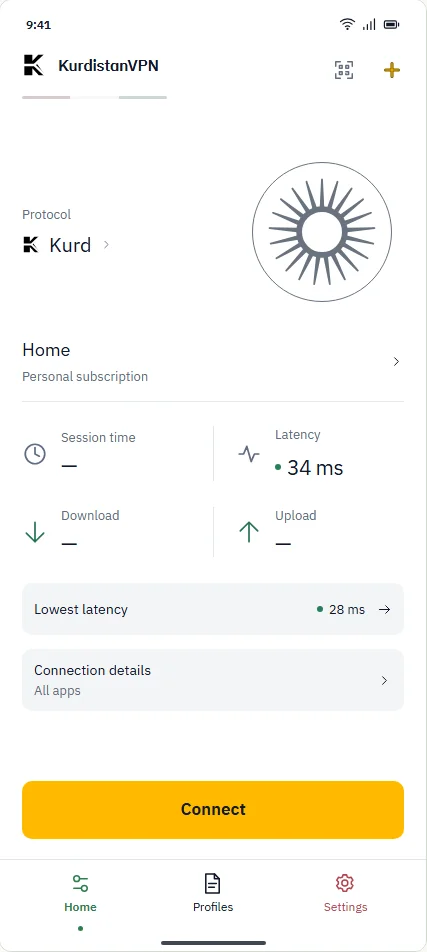
What this preview proves—and does not#
Grandma Mode demonstrates a simpler interface.Engineering / design previewView evidence
- What this means
- Large text, fewer choices and guided help offer another view of the same connection model.
- How the design works
- The supplied design prototype contains Home / Help / Settings and explicit setup and recovery steps.
- The limit
- This is design-prototype evidence, not proof that this exact experience ships in an available APK. Translation review and real-user studies remain necessary.
src/prototype/app.htmlReviewed . Source code alone is not release qualification.
Source and scope
Reviewed . The linked source describes the implementation; released-build evidence is a separate check.